File Management Suite
Organize your files automatically with FileSuite
Try it free for 7 days! Full functionality included during the trial period.
FileSuite is a powerful and modern file management tool designed to help you organize, clean and understand your files with speed and precision.
Built with performance in mind, FileSuite combines fast scanning, intelligent duplicate detection, automatic folder organization and clean visual previews — all in a lightweight and privacy‑focused interface.
Whether you work with documents, images, videos, audio files or large mixed folders, FileSuite gives you full control with minimal effort.
Organize your files automatically
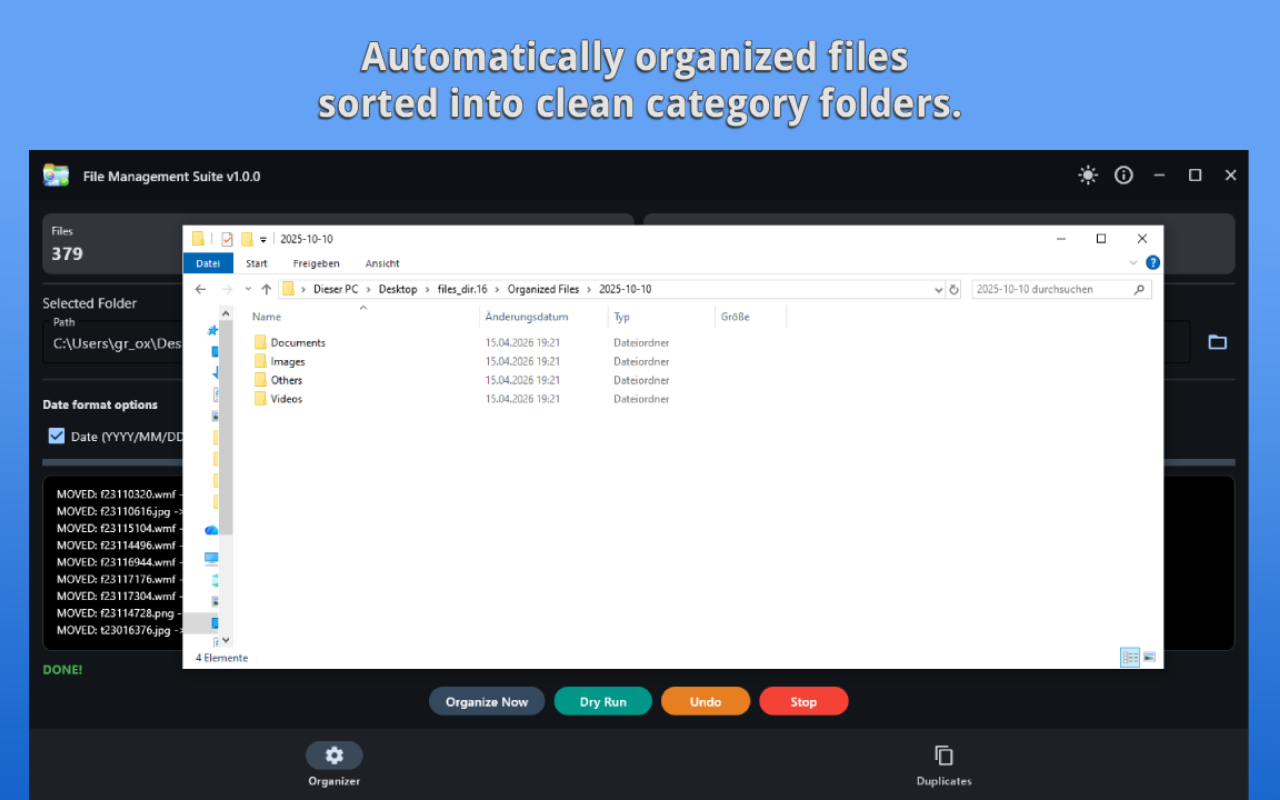
FileSuite can analyze any folder and reorganize its contents into a clean, structured layout.
Files can be sorted by:
- file type
- category (images, documents, videos, audio, archives, code, design files, 3D models, fonts, databases, configs, executables, etc.)
- date (year, month or day)
You can run a dry‑run simulation to preview changes before applying them, and you can undo the entire operation at any time.
Find and remove duplicate files intelligently
FileSuite uses multiple advanced detection methods to find duplicates:
- MD5 hashing for exact duplicates
- Perceptual hashing (pHash) for visually similar images
- PDF first‑page hashing for duplicate or similar PDF documents
- Text similarity (RapidFuzz) for near‑duplicate text files
- DOCX text extraction for document comparison
You can preview duplicates, select which ones to keep, and delete or move the rest with a single click.
- Preview files instantly
FileSuite generates quick previews for:
- images (with thumbnails)
- PDFs (first‑page rendering)
- text files (TXT, CSV, MD)
- DOCX documents
This helps you identify files faster without opening external applications.
Fast scanning and responsive UI
Thanks to multi‑threaded processing, FileSuite can scan thousands of files quickly while keeping the interface smooth and responsive.
All operations run in the background without blocking the UI.
Privacy‑first design
FileSuite processes everything locally on your device:
- No data collection
- No telemetry
- No internet connection required
- No ads, no tracking, no subscriptions
Your files stay private — always.
Key features at a glance:
- Automatic folder organization
- Smart duplicate detection (MD5, pHash, PDF pHash, text similarity)
- Quick previews for images, PDFs, text and DOCX
- Multi‑threaded scanning for high performance
- Undo support for safe operations
- Dark and light themes
- Clean and intuitive interface
- Works fully offline
- One‑time purchase — no subscription
Perfect for:
- Photographers managing large image libraries
- Students and professionals organizing documents
- Anyone cleaning up old drives or backups
- Users who want a faster, cleaner alternative to File Explorer
- Anyone who values privacy and local processing
NEW: Bulk File Renamer (Version 1.0.1) and German Localization Update
A powerful renaming tool for large batches of files:
- Auto‑numbering with custom start index
- Prefix and suffix support
- Find & Replace text
- Case conversion (lowercase / uppercase)
- Live preview of all changes
- Safe rename with validation
RELEASE NOTES — Version 1.0.1
Version 1.0.1 — Bulk File Renamer Update
• Added powerful Bulk File Renamer tool
• Live preview of all rename operations
• Support for prefixes, suffixes, auto numbering, and text replacement
• Case conversion (lowercase / uppercase)
• Improved UI responsiveness
• Minor bug fixes and stability improvements
If you want a faster, cleaner and more modern way to manage your files on Windows, FileSuite is the perfect tool to enhance your daily workflow.